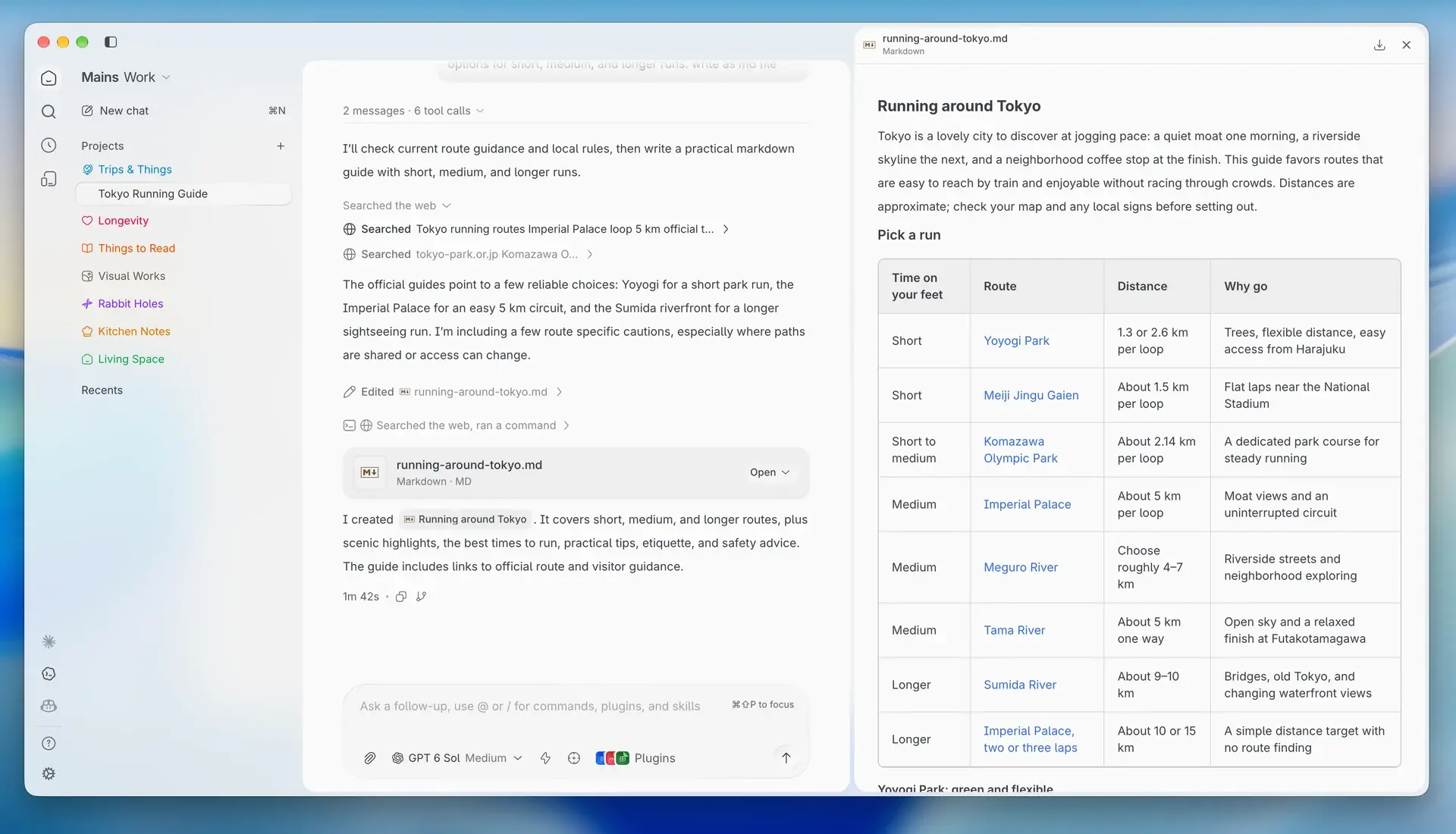
Mains 0.9: Code, Work, Chat
A space now picks what Mains is for. Code is what you had, Work is the same agents pointed at documents instead of repos, and Chat can't touch your disk — enforced, not just promised.
Every space in Mains used to answer one question: which agent runs underneath it. 0.9 adds a second one — what you're here to do. A space now has a mode, and the mode reshapes both the app around the agent and the rules the agent works under.
Three modes, one picker
The picker sits at the top of the sidebar. Code is everything Mains has been — repos, branches, diffs, terminal. Work is the same agents pointed at documents, reports, and digests, with the git machinery gone. Chat is a conversation that cannot modify anything.
⌘1, ⌘2, ⌘3 switch between them. Mode belongs to the space, not the app, so a Code space and a Chat space can sit side by side in the sidebar and behave completely differently.
Work and Chat are available with Claude and Codex today. Copilot and Cursor stay on Code for now — their harnesses don't yet give us the levers the other two modes need.
The app changes shape


Work drops the developer ceremony: no git actions, no terminal, no Changes tab, no permission dropdown. Files and Activity stay, because in Work the deliverables are files. Chat goes further and removes every write-adjacent control, keeping Files for reading.
The sidebar follows. Code lists workspaces under Add Project; Work and Chat list chats under New chat, grouped into collections. Model, effort, thinking, and fast mode stay in all three — those are about the engine, not the experience.
So does the agent
A mode isn't a skin. Each one carries a harness — a prompt delta, a tool policy, and provider settings — resolved once, when a run starts.
Work takes Bash away and accepts edits by default. Its prompt asks for plain language over tool names — "scanning the folder for documents", not "running grep" — and for finished files rather than fragments in chat. On Codex, the tone comes from Codex's own friendly personality, applied natively.
One distinction worth knowing: Work's accept-edits is a default — a choice you make in the composer still wins. Chat's read-only is an override — nothing a client asks for can turn a Chat space into a writing one.
Code is untouched. Until a space opts into Work or Chat, the harness isn't there.
The mode sticks to the run
Every run records its space's mode when it starts. Resume and fork re-derive the harness from that record, not from the space's current setting — so switching a space from Work to Code doesn't hand Bash to a run that began without it, and a forked conversation keeps the contract it was born under.
Collections

Work and Chat needed what projects are to Code — a place for related runs and shared context — without a git repository. That's a collection: a name, an icon, a set of chats, and a set of sources.
Sources are files you add or text you paste. When a chat in a collection starts, resumes, or forks, the current sources are copied into that run's own working tree and recorded with their content hash. Move a chat to another collection and its next turn sees the new sources; nothing that already happened is rewritten.
Collections are created and edited right from the sidebar, with an icon picker that takes an emoji or any of the built-in icons in any tint. Chats can be renamed inline from the same menu.
Documents open inside Mains

When the agent produces a report, a spreadsheet, or a deck, you don't have to leave the app to read it. Word, Excel, and PowerPoint files render in-app; Markdown renders with Mains' own typography, with working section links and task-list checkboxes.
Files the agent writes live in the run's directory. Save a copy… opens a native save dialog and puts the document wherever you actually want it.
Pulses for Work and Chat
Scheduled pulses now carry a mode, and templates declare which modes they belong to. The original templates are git-centric and stay in Code. Work gets a set built around documents — Daily document digest, Weekly report draft, Meeting notes cleanup, Executive one-pager. Chat gets read-only briefings — Daily briefing, Weekly recap, Devil's advocate pass, Plain-language explainer.
Neither needs a workspace. They run on their own, and can point at a collection, whose sources travel with them.
Git stays in your hands
Mains used to hand the agent its own commit and pull-request tools. 0.9 removes them. Commits and PRs go through the git actions panel — yours to trigger, with the diff in front of you — or through the shell, if you explicitly ask the agent to. What's left of Mains' own tools is reviews and package checks, and those exist only in Code.
Worktrees are off by default on fresh installs. New workspaces work directly in the repository unless you turn worktrees on in Settings → Git. If you'd already made the choice, nothing changes.
Smaller things
- Every workspace now belongs to exactly one project, enforced at the database level. Older installs are backfilled by the migration.
- Removing a project runs the full cleanup — provider sessions and worktrees included — instead of a cascade that left them behind.
- Sidebar icons are mode-aware, and a space's mode can be switched from the sidebar directly.
- A much larger icon set for spaces and collections, with the same picker everywhere an icon is chosen.
- Codex's personality is now a setting. Work and Chat set it to friendly for you.
- Markdown in replies got stricter: inline code and code blocks render distinctly, task lists render as checkboxes, and
#sectionlinks scroll to the section. - Codex runs no longer send a model when you haven't chosen one, so the CLI's own default applies.
- Untracked binary files no longer trip the git snapshot.
- The composer hint says plugins, matching what the command actually lists.
Mains 0.9 is available for macOS (Apple Silicon and Intel), and open source under the MIT license at github.com/mainsdotdev/mains.
Questions or feedback? Reach out to team@mains.dev