changelog

Mains 0.8: Leave It Running

Runs keep working in workspaces you've left, the git panel finally pulls, and the context window shows you where every token went.

0.7 put issues and pull requests on one screen. 0.8 is about the runs themselves — the ones you start and then walk away from. A run in another workspace is no longer out of sight, the git panel covers the half of the workflow it was missing, and the context window is something you can read instead of guess at.

Runs you left behind, still on screen

Start something in one workspace, switch to another, and the first run vanished from the app. It was still going — you just had no way to know.

Background runs now sit above the sidebar footer as a deck: the newest run face-up, the rest as edges peeking above it. Hover and the deck fans open. Each card carries the workspace it belongs to, how long it's been running, and its last line of activity — so you can tell a run that's thinking from one that's stuck without opening it.

Click a card to jump straight back into that run. Stop it from the card if it's gone the wrong way. The dock renders nothing at all when everything live is already in front of you.

The git panel pulls now

The git actions panel with Pull, Branch, Commit, and Pull request rowsOpening a pull request with a base branch picker

Every git action lived in one panel except the one that brings work in. Pull is a single row — fast-forward only, with the behind count next to it. No form, because a pull takes no input. If it can't fast-forward, git's own wording tells you why and nothing changed.

New branch forks off the checked-out one without stashing first: uncommitted changes come with you, and the workspace's pull request base moves to the branch you left.

And a pull request no longer has to target whatever the workspace decided. Pick the base in the form, and the generated description is written against that base — not against a diff you're not opening.

Where the context window actually went

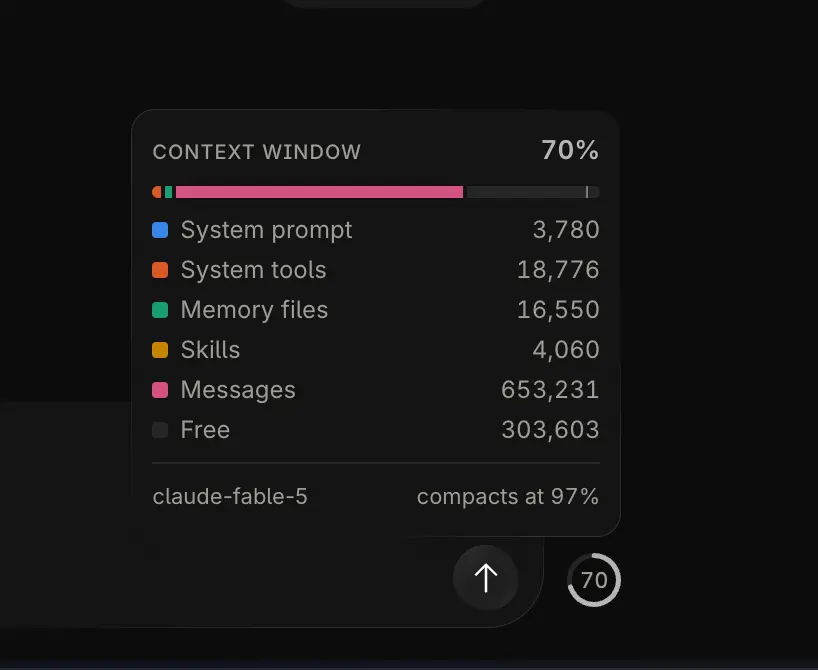
The context window breakdown, with a token count per category

The context meter used to be one number. Now the ring breaks into categories — system prompt, system tools, memory files, skills, messages — each holding its color for the life of the run, so a category you're watching doesn't change hue every time something else grows past it.

Hover for the full breakdown, including the parts that aren't yours: free space, the buffer auto-compaction keeps in reserve, and schemas the provider deferred. The ring turns amber, then red, as the fill gets serious — the number and the arc always agree on the state.

Set it to the size you actually read

Two sliders in Settings → General. Interface rescales the whole app — text, spacing, every dimension — from 12 to 18. Code is separate and stays in pixels, driving the diff viewer and every code surface from 10 to 18, because the size you review a diff at isn't the size you read a sidebar at.

Inter now ships inside the app rather than being fetched, so the app renders the same on every machine, first launch included.

Space colors, everywhere they belong

A space's theme color stopped at the background. It now tints the composer glow and your own message bubbles, so a space reads as itself while you're typing in it, not only at the edges. Set a theme override per space when you want a different one, and surfaces with no usable color fall back to exactly what they looked like before.

The composer carrying the active space's theme color as an ambient glow

Smaller things

  • A real About window — version, Electron, Chromium, Node, macOS, and architecture — replacing the stock system dialog.
  • Search in the connection wizards. Typing dev mains finds mainsdotdev/mains; every token has to match, in any order, so you don't have to guess how a provider separates owner from name.
  • Codex messages no longer show streamed citation markers in the text or in reasoning output.
  • Codex plugins say why they can't be installed — disabled by an administrator, not available on your plan (with the eligible plans listed), or a required app is unavailable — instead of an install that quietly does nothing.
  • Claude's permission mode agrees with itself. The default lived in four places that had drifted apart, and the settings screen claimed a different mode than runs actually used. New installs start on auto; a mode you already chose is left alone.
  • Keyboard navigation now continues correctly after a dropdown or modal closes, and buttons, tabs, dropdowns, modals, and form controls carry proper labels and roles throughout.
  • Diff rows keep their red/green tinting under the new surface styling.
  • Test files get their own icons in the explorer, and the error boundary got a rewrite.
  • Preview builds are now cut from dev and published as prereleases — visible on GitHub, invisible to the auto-updater, so stable stays stable.

Mains 0.8 is available for macOS (Apple Silicon and Intel), and open source under the MIT license at github.com/mainsdotdev/mains.

Questions or feedback? Reach out to team@mains.dev