changelog

Mains 0.10: Mobile is here

Mains is two apps now. The Mac still runs the agents; an iPhone pairs with it over a QR code and drives them — approve a tool, send the next prompt, read the transcript — from wherever you are.

0.8 made a run survive the workspace you left. 0.9 made a space say what it was for. 0.10 is about the last thing still tying you to the chair: a run waiting on an answer only reaches you if you're sitting in front of the Mac.

So Mains is two apps now. The Mac keeps everything that does work — the agents, the repos, git, the terminal, the database. The phone pairs with it and becomes another window onto the same runs.

Pairing is a QR code and a token

Settings → Relay → This machine grows a Pair a phone row. It shows a QR code; the phone's camera reads it and the two are paired.

Two credentials, deliberately different in lifetime:

A pairing code is minted by the Mac, lives only in memory, expires after five minutes, and works for exactly one exchange. Restarting the app mid-window just means showing a new code.

A device token is what the code buys. It's long-lived, stored on the phone in the secure enclave, and stored on the Mac only as a hash — revocable per device from the same panel, which lists every paired phone with its platform, app version, and when it was last seen.

The phone needs a route to the Mac, so pairing is only offered once Network access (LAN) or Tailscale HTTPS is on — a loopback-only host has no address a phone could use. No camera (a simulator, or a denied permission)? Copy the pairing link and paste it in the app.

What a paired phone is allowed to do

This is the part worth reading twice. A phone in the wrong hands must not become a shell on your Mac, so reach is an allowlist rather than a policy — three of them, enforced before any handler runs.

Reads are the run and workspace surface: runs and their turns, tool calls, artifacts and context, workspaces with their branch and last diff size, projects, collections, spaces, enabled providers, models, skills, and slash commands.

Mutations are seven verbs, and only seven: answer an approval request, continue a run, start one, fork one, stop one, change a space's mode, and patch the composer's run settings. Every one of them carries a commandId that the WebSocket router turns into exactly-once semantics through a command_receipts table — a command retried after a dropped connection returns its stored result instead of running again. Receipts are kept for a week; nothing retries later than that.

Files, git, the terminal, and settings are on none of these lists, and won't be.

Two more edges are closed. Provider configs are projected on the way out: a paired device sees effort level, permission mode, and the fast/goal/plan switches, and never the API key or base URL. And outbound pushes are allowlisted the same way — the WebSocket sink drops any bus event that isn't one of the eight a phone subscribes to, so terminal output and settings changes stay between the desktop's own processes.

The phone keeps its own copy

The phone's sidebar: mode segment on top, run target above the composer, and the drawer belowThe drawer, listing a Code space's workspaces with the space switcher pinned at the bottom

The app isn't a viewport onto a socket. It keeps a SQLite database of what it has seen — spaces, collections, workspaces, runs, turns, tool calls, artifacts, pending approvals — shaped from the wire DTOs and tagged with the backend they came from.

The direction is Mac → phone only, so there's nothing to merge: a newer answer replaces the row. Screens read those tables through live queries and never touch the socket themselves, which is why opening the app in a lift shows you the last known state of every run instead of a spinner. Each run carries its own sync cursors — the newest tool-call timestamp and the highest artifact id — so a reconnect fetches the delta rather than the run.

Pair more than one Mac and each keeps its own rows; the settings screen says which one you're talking to and how the two are getting on.

The connection lives outside React

The socket is owned by a supervisor, not by a component. Offline, it drops the socket and waits for the network signal instead of burning battery on retry timers. Back in the foreground, it makes sure a socket exists. An endpoint that never opens is retried three times and then rotated — the pairing link carries every address the Mac could be reached on, most private first — and a full cycle of failures parks in unreachable, retried slowly and on any signal.

A refused token is its own state: nothing to retry until you pair again, so it says so rather than looping. And an open socket isn't a connected one — describe and the first snapshot sync have to finish first, which is also what runs again after every reconnect.

Both ends declare a protocol version on the first call. A mismatch stops there with the sentence that fixes it: which side is older, and that it needs updating.

The app itself

Home is a chat app's new conversation. The mode segment sits on top — Code, Work, Chat, the same three 0.9 gave a space — an empty canvas below it, the run target above the composer, and the composer at the bottom. Send doesn't leave the screen: the prompt goes up as a bubble immediately, the Mac's run id follows, and the transcript fills in underneath.

The drawer follows the desktop sidebar. A Code space lists its workspaces with their branch and the size of the last diff; a Work or Chat space lists that provider's chats, grouped under the projects they're filed in with the rest under Recents. The space switcher is pinned at the bottom next to Settings.

Search is its own full screen, field at the bottom beside the keys and results above it, and it searches everything on the Mac at once — chats by title or by their project's name, workspaces by name or branch — regardless of which space is selected.

Reading a run on a small screen

The transcript is the desktop's, ported rather than approximated. Tool calls go through the same registry and render as the same rows, markdown gets Mains' own typography, and mentions carry the weight and tint they have in the composer.

The progress line above the composer keeps the mode's voice — Developer talks about the work as engineering, Work as knowledge work, Chat like someone thinking — and the spinners are the desktop's four shapes, phase table for phase table, with one clock per spinner running on the UI thread so nothing reaches JavaScript while they spin.

Images the agent produced render inline. The Mac scales them on the way over and the phone caches what it has fetched; tap one for a full-screen viewer with pinch-to-zoom, double-tap, pull-to-dismiss, and a share sheet that writes a real file with the right extension.

Answering the agent from the couch

An approval card on the phone: the tool, its input, and allow or denyThe run options sheet: permission modes with what each allows, and the fast, goal and plan switches

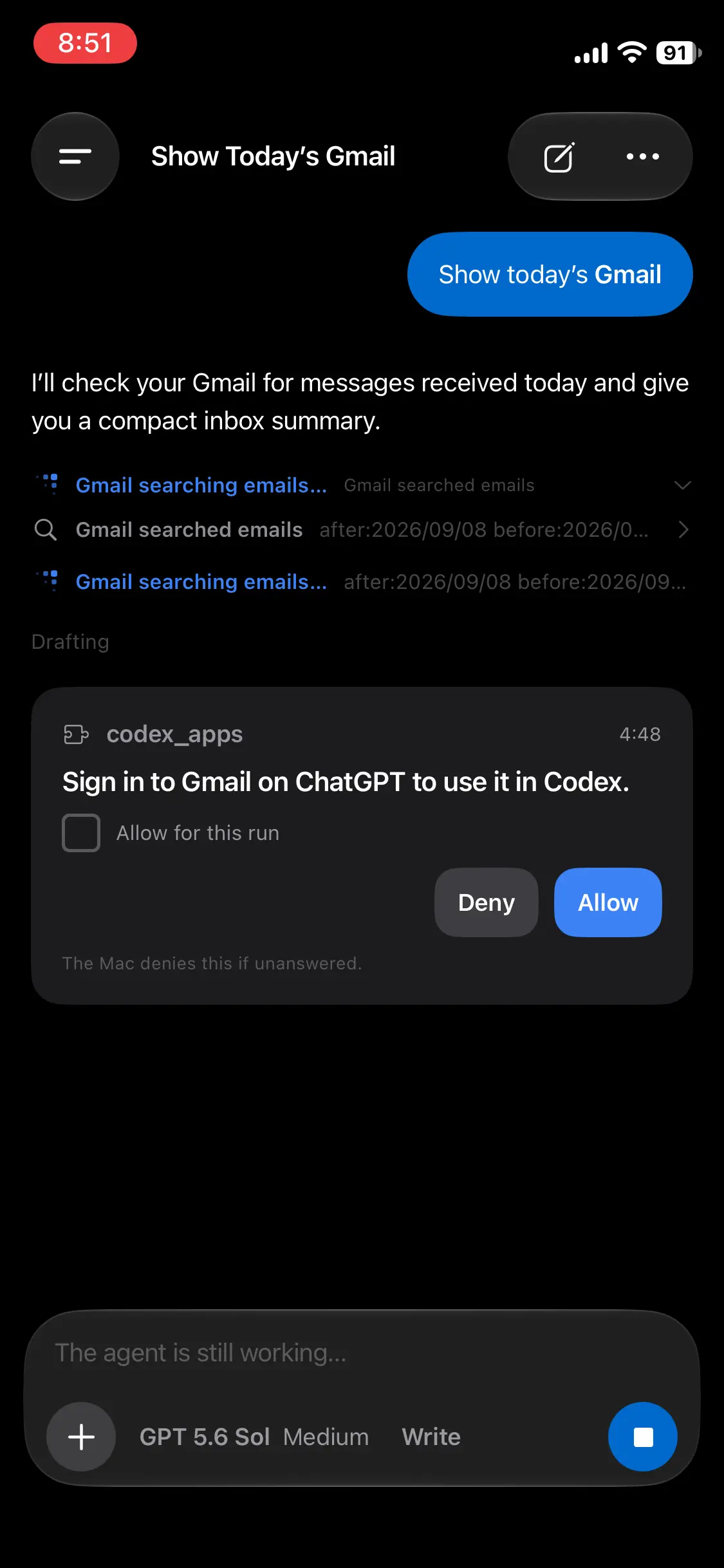
This is the loop the whole release exists for. A request the agent is waiting on syncs as a row like anything else, so it's still there when you open the app — and the card offers the answer surface the desktop dialog does: allow or deny for a tool, options or free text for a question, open-and-accept for a URL. Requests time out after five minutes, and one that expired was already denied on the Mac, so the phone never answers into the void. Schema-driven form elicitations stay on the desktop for now; the card can only decline them.

The model sheet lists what the provider can run with each model's effort levels, and the run options sheet — opened from the permission chip — lays out the permission modes with what each one allows, plus the fast, goal, and plan switches, shown only where the provider and model support them. These are the Mac's provider settings, shared with the desktop: providers:updateRunSettings is a narrow patch of exactly those fields, which is why it's on the command list at all while providers:update — the one that replaces the whole config, credentials included — stays desktop-only.

Data sharing is asked for, not assumed

The AI data sharing sheet, naming the provider, the recipient, and its privacy policy

Before the phone lets one Mac send its prompts to one provider, it asks — naming the service, who receives the data, and linking their policy: OpenAI for Codex, Anthropic for Claude Code, GitHub for Copilot, Anysphere for Cursor.

That permission is deliberately phone-owned rather than synced, and keyed by Mac, provider, and disclosure version. A new Mac, a new provider, or a materially changed disclosure asks again. Settings → AI Data Sharing shows what you've granted and lets you take any of it back.

What the phone can't do yet

Worth saying plainly.

It's iPhone only — Android is planned, not shipped. There are no push notifications yet, so a run waiting on you shows the moment the app is in front of you, not before; the approval is durable and queryable, which is the half that had to exist first. There's no terminal, no file browsing, no git actions, and no diff viewer — a workspace row shows its branch and the size of the last diff, and that's where it stops. And the app is a client: with no Mac in reach, it shows you what it last saw and waits.

Smaller things

  • Codex can continue a run that never named a model. The app-server refuses thread/resume without one, so a run started with no model and no configured default died on its second turn. The driver now falls back to the live catalog's own default, cached for five minutes.
  • A live run refuses a second prompt. The send button already read Stop, but Enter in the editor reached the handler anyway and started a new run. The submit itself says no now.
  • An emptied composer reads as empty again. Deleting the last character leaves a filler <br> behind, which serialized as a newline — placeholder gone, send button live, nothing to send.
  • Work mode knows it has the web. Its harness now states that WebSearch and WebFetch are available and authorized, so a question about anything current gets searched instead of answered from memory or refused.
  • Space and collection icons moved into @mains/icons, generated once and drawn by both apps.

Mains 0.10 is available for macOS (Apple Silicon and Intel), and open source under the MIT license at github.com/mainsdotdev/mains. The iOS app ships through TestFlight while it's in review.

Questions or feedback? Reach out to team@mains.dev